


Wireframes vs. Design Comps: What’s the Difference?
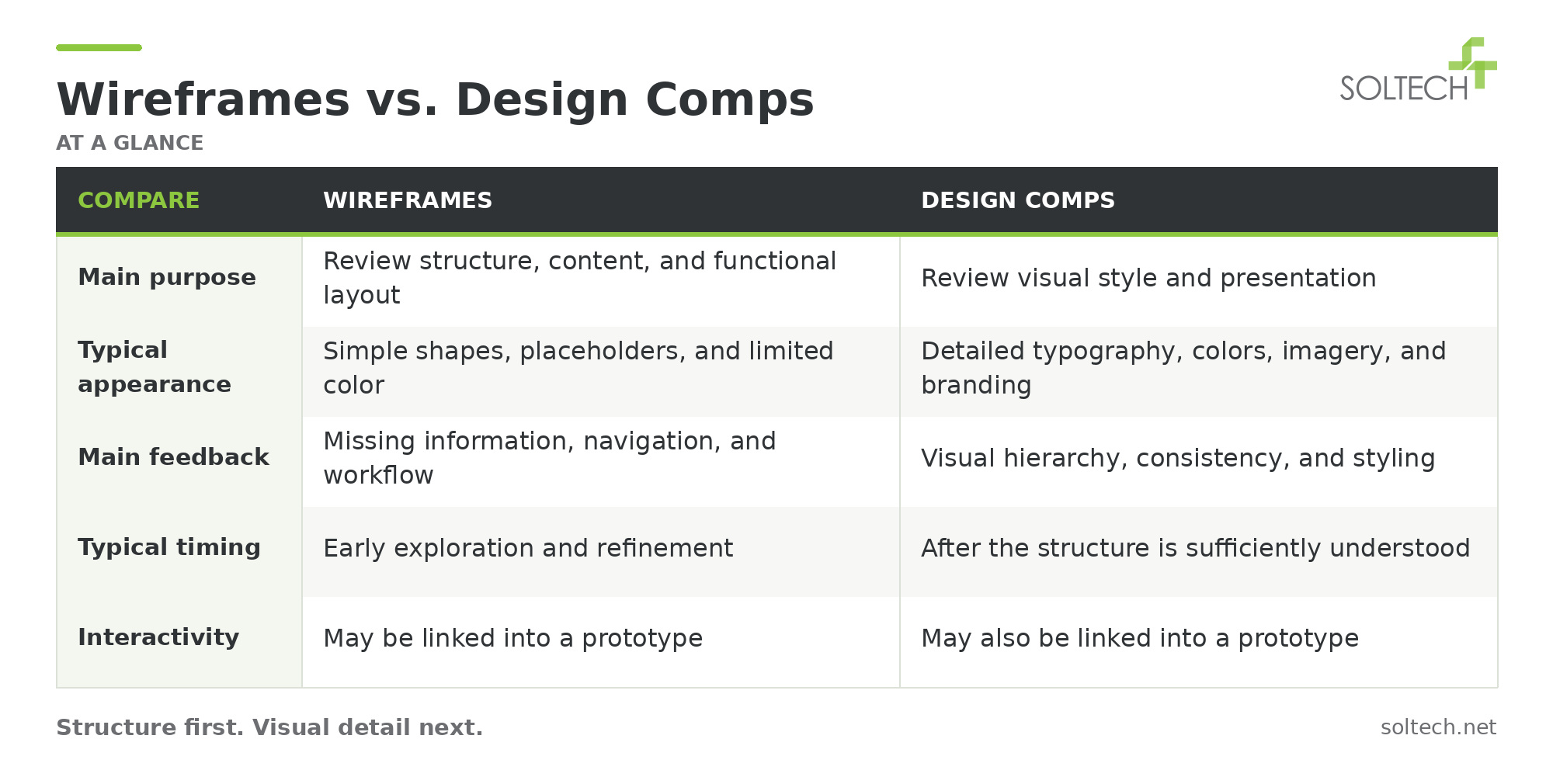
A user interface wireframe shows a screen’s structure, content, and functional layout. A design composition, often called a “comp” or visual mockup, shows its intended appearance, including colors, typography, imagery, and branding.
Both help stakeholders review an application before it is built. The difference is what you are evaluating: wireframes focus on organization and function, while design comps focus on visual presentation.
Article overview: This guide explains how wireframes and design comps differ, when to use each, and what business and technology leaders should review before development.
Why Design Work Matters Before Development
Software development is not an inexpensive proposition, which makes upfront design work valuable for identifying missing requirements and clarifying expectations.
The old adage that a picture is worth a thousand words often holds true in software design. Stakeholders can engage more easily when they can see a visual representation of their application.
However, visual designs usually do not represent the starting point. Discovery is needed to understand the user audience, business objectives, and core software requirements.
Visual designs then demonstrate the proposed layout and appearance. Annotations and interactive prototypes can help explain how the application should behave. This gives stakeholders a chance to request changes before those decisions are implemented in software.

Where Wireframes and Comps Fit in Software Design
A completed software design usually includes a combination of artifacts.
These may include business, functional, and system requirements specifications; conceptual data mapping; use cases; epics and stories; flow diagrams; information architecture; wireframes; and screen compositions.
Information architecture organizes content and establishes a structure that users can understand. For example, a designer may establish a site map before focusing on the design of an individual web page.
Most of us naturally want to understand the bigger picture before digging into a specific feature. Once the team understands the overall structure and key screens, wireframes and comps help bring those screens into focus.
What Are Wireframes and How Are They Used?
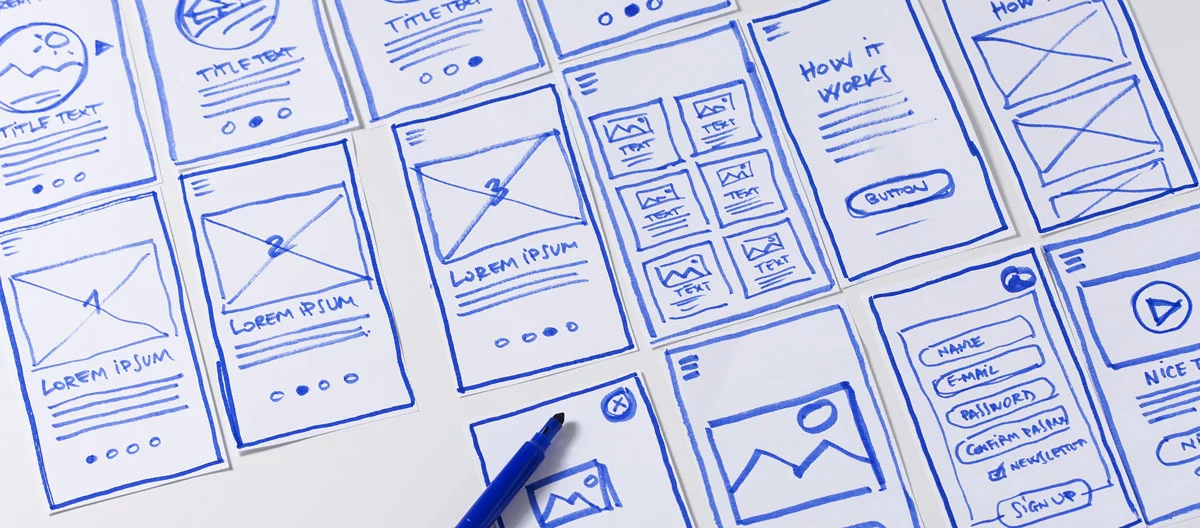
A wireframe provides a visual guide to the skeletal framework of a user interface screen. It lays out the basic elements and shows where each component will be situated.
People contributing to the requirements and design of a software solution may create or help refine wireframes. These can include solution architects, user experience architects, software engineers, business analysts, and end users.
Wireframes provide a quick way to see the data, fields, navigation, and controls proposed for a screen. They help the team discuss whether the arrangement supports the user’s tasks.
What Should Stakeholders Review in a Wireframe?
Focus on whether the screen includes the information and actions users need:
- Are important fields or actions missing?
- Is the content organized in a useful order?
- Does navigation support the intended workflow?
- How should the layout change on smaller screens?
A layout that works on a wide-screen monitor may need to be reimagined for a mobile phone.
Designers often use black, white, and gray for early wireframes. Some tools even make them look hand-drawn. The purpose is to focus discussion on features, flow, and function before aesthetic considerations such as branding and color schemes.
What Are Design Comps and How Are They Used?
A design composition brings visual elements together into a complete screen design. A UI or visual designer considers colors, images, graphics, typography, and spacing to establish the interface’s visual style.
Unlike a basic wireframe, a comp shows how branding and stylistic choices will appear in the application.
Comps can look very close to the finished product. However, an approved comp is a design representation, not a working application. It still needs to be implemented and tested.
What Should Stakeholders Review in a Design Comp?
Review the visual choices and whether they support the intended audience and tasks. Consider the clarity of text, prominence of important actions, consistency between screens, and alignment with your brand.
Ask the team to show relevant variations, such as mobile layouts, error messages, and selected or disabled controls.
Comps give stakeholders an opportunity to review these details before implementation. They help reduce the risk of building an interface that differs from expectations.
How Designs Progress From Early Concepts to Detailed Screens
To use an analogy from automobile design, wireframes are like early pencil sketches of a new vehicle. Comps are like the polished concept renderings that might appear in a magazine.
The pencil sketch invites discussion and allows the team to explore alternatives quickly. The rendering represents more detailed visual decisions.
In software design, this level of detail is often called fidelity. Low-fidelity designs communicate early ideas. Higher-fidelity designs provide more detail about the proposed interface.
Wireframes may begin as simple layouts and become more detailed through stakeholder review. Designers can add validation rules, navigation notes, and annotations explaining dynamic features.
Comps then establish the visual treatment for selected screens and reusable components. The exact sequence varies by project; teams may revisit earlier decisions as they learn more.
A realistic comp can also support pre-release marketing or investor presentations. Its appearance should not be mistaken for evidence that the application has already been built.
How Are Wireframes and Design Comps Created?
Designers start by understanding the project’s purpose, scope, users, and requirements.
For wireframes, they sketch the structure and refine the layout with content placeholders and annotations. Stakeholder feedback helps identify missing information or unclear workflows.
For comps, they develop the typography, colors, imagery, and components within that structure. Tools such as Figma, Sketch, or Photoshop can support parts of this work.
The deliverable should include enough information for the development team to understand the design. That may require additional specifications, interaction notes, and supporting assets.
 Choose the Right Level of Design for Your Project
Wireframes and comps serve different purposes, and many projects benefit from both.
For a simple screen or a familiar interface built from established components, a separate wireframe stage may be brief. More complex workflows often benefit from additional exploration before detailed visual design.
One approach is to wireframe the key screens and workflows, then create comps for representative screens to establish the styling used throughout the application.
Highly branded interfaces may need more visual exploration. Internal applications still need clear, accessible design, even when less time is spent on custom visual styling.
Before approving a design, clarify what the approval covers and how later changes will be handled. A visual approval does not remove the need for usability testing or further refinement.
In our guide, Find Your Software Soulmate, you will discover questions to ask when determining whether a software firm is a fit for your needs.
Frequently Asked Questions About Wireframes and Design Comps
Do I need both wireframes and design comps?
It depends on the project’s complexity and existing design standards. Complex workflows often benefit from wireframes before detailed visual design. A simple interface using established components may need less separate wireframing. Agree on the appropriate deliverables with your design team.
Are design comps more expensive than wireframes?
Design comps typically take more time because they include visual details such as typography, colors, and imagery. However, cost depends on the number of screens, required detail, revisions, and existing components. Highly annotated wireframes can also require substantial effort.
Are wireframes, design comps, and prototypes the same thing?
No. Wireframes emphasize structure and layout, while design comps emphasize visual appearance. Prototypes demonstrate interactions or navigation. A prototype can use either simple wireframes or detailed visual designs, depending on what the team needs to test.
What should executives approve before software development begins?
Confirm that key workflows, required information, and visual direction meet the project’s goals. Clarify which screens and states have been reviewed, what remains unresolved, and how changes will be managed. Design approval should be supported by requirements and relevant testing.

Thayer Tate
Chief Technology Officer Thayer is the Chief Technology Officer at SOLTECH, bringing over 20 years of experience in technology and consulting to his role. Throughout his career, Thayer has focused on successfully implementing and delivering projects of all sizes. He began his journey in the technology industry with renowned consulting firms like PricewaterhouseCoopers and IBM, where he gained valuable insights into handling complex challenges faced by large enterprises and developed detailed implementation methodologies.
Thayer’s expertise expanded as he obtained his Project Management Professional (PMP) certification and joined SOLTECH, an Atlanta-based technology firm specializing in custom software development, Technology Consulting and IT staffing. During his tenure at SOLTECH, Thayer honed his skills by managing the design and development of numerous projects, eventually assuming executive responsibility for leading the technical direction of SOLTECH’s software solutions.
As a thought leader and industry expert, Thayer writes articles on technology strategy and planning, software development, project implementation, and technology integration. Thayer’s aim is to empower readers with practical insights and actionable advice based on his extensive experience.
Recent Posts
Search