


Database vs Spreadsheet: What to Do When Your Tools Stop Scaling with Your Business
By Thayer Tate
Understanding the Shift from Flexibility to System Design
It usually starts small.
A team builds a spreadsheet to track customer data. Then another to manage operations, and eventually a third to support reporting. Early on, this works well. Spreadsheets are fast, flexible, and easy to adapt, allowing teams to move quickly without formal systems or structure.
Over time, however, complexity begins to build.
That one spreadsheet becomes several. Data is copied between files, teams work from slightly different versions, and reporting requires manual reconciliation. As a result, confidence in the data starts to decline.
This is the point where the database vs. spreadsheet question shifts.
It is no longer just a tooling decision. It becomes a reflection of how your organization manages data, coordinates work, and supports decision-making at scale.
Understanding the difference is not about choosing the “better” technology. It is about recognizing when your current approach no longer aligns with how your business operates.
The shift described above is what drives the need to think differently about how data is structured and managed.
The Difference Between Spreadsheet and Database Systems
Purpose and Operational Intent
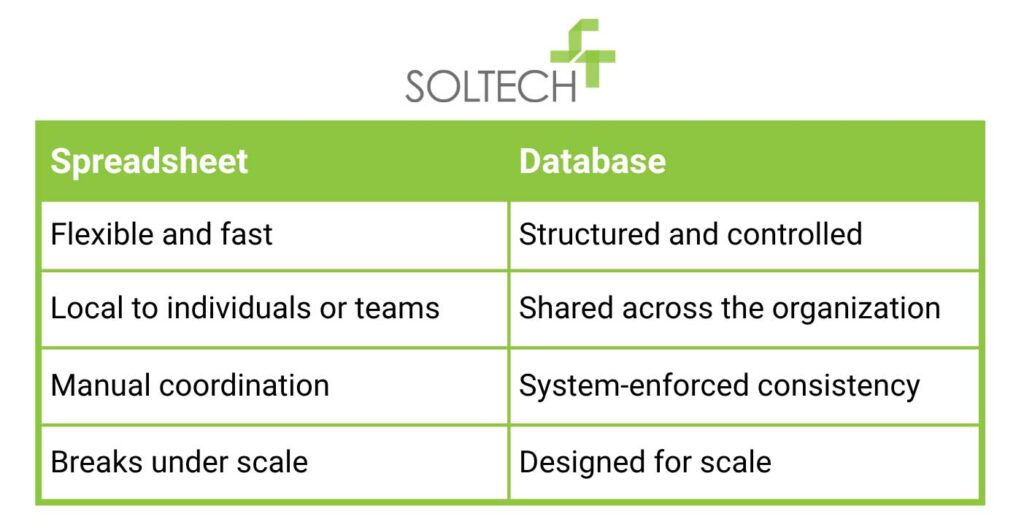
In practice, the core difference between spreadsheet and database systems is not technical complexity, but operational intent.
- Spreadsheets support localized, user-driven workflows
- Databases support coordinated, system-level workflows
A spreadsheet allows individuals or small teams to shape data as needed. A database defines how data is structured, accessed, and maintained across the organization.
This distinction becomes critical as decisions rely on shared data rather than isolated analysis.
Data Relationships and System Reliability
Spreadsheets organize data in flat structures. This works well for visibility, but it does not enforce relationships between datasets.
A typical database system example introduces connected structures:
- A customer table
- An orders table
- A products table
These relationships ensure that changes in one area are consistently reflected elsewhere. Without this structure, organizations often rely on duplicated data across multiple spreadsheets, which introduces subtle inconsistencies over time.
What we see most often is not incorrect usage, but a series of incremental workarounds. Additional tabs, copied datasets, and manual reconciliations gradually become part of the workflow.
Why Spreadsheets Stop Scaling
Complexity Does Not Announce Itself
Spreadsheets rarely fail in obvious ways. In practice, they tend to accumulate friction over time.
You may start to notice:
- Increased time spent validating data
- Conflicting versions of reports
- Dependence on specific individuals
- Slower response times
These are not technical issues. They are signals that your data model is no longer aligned with how the organization operates.
Data Becomes a Dependency
As your business grows, data shifts from being a reference point to a dependency. It informs customer interactions, financial reporting, and operational planning.
At this stage, inconsistencies are no longer minor inconveniences. They affect timing, coordination, and trust in decision-making.
Gartner has cited research estimating that poor data quality costs organizations an average of $12.9 million annually. In many cases, this is not due to lack of effort, but systems that evolved without intentional structure.
A Practical Growth Scenario
A regional services company initially managed scheduling, customer records, and billing through spreadsheets. The system worked well when coordination was informal and centralized.
As the organization expanded:
- Field teams needed consistent, real-time visibility
- Finance required standardized billing inputs
- Leadership depended on consolidated reporting across locations
To meet these needs, additional spreadsheets were introduced, along with manual checks to maintain alignment. Over time, reporting cycles slowed, and confidence in the data required additional validation before decisions could be made.
This is a common inflection point. The system has not failed, but it is no longer scaling with the business.

What a Database System Changes
Structure Introduces Accountability
A database introduces a defined structure for how data is stored, maintained, and owned across the organization. This introduces clarity around ownership, updates, and dependencies, but it also requires more upfront design.
Poorly structured databases can introduce their own challenges, including rigid schemas or misaligned data models that are difficult to adapt.
Controlled Access and Concurrent Use
Databases are designed for multi-user environments. They allow controlled access, auditability, and consistent updates across teams.
This reduces reliance on informal coordination, but it also requires governance. Without clear access policies, even well-designed systems can become fragmented.
Scalability with SQL Databases
SQL databases are commonly used because they balance structure with flexibility. They support:
- Complex queries across large datasets
- Data integrity through constraints
- Concurrent access without overwrites
- Integration with other business systems
At the same time, they introduce considerations around performance tuning, schema design, and long-term maintenance. The benefit is not simplicity, but reliability at scale.
When to Move from Spreadsheet to Database
Recognizing the Strategic Moment
The decision to move from spreadsheet to database is rarely triggered by a single issue. In most organizations, it emerges as operational friction begins to compound.
You may be at this point if:
- Data is shared across multiple teams with different priorities
- Reporting requires reconciling multiple sources of truth
- Data accuracy depends on manual oversight
- Access control and auditability become important
Salesforce reports that 80% of business leaders say data is critical in decision making at their organization. As reliance increases, the tolerance for inconsistency decreases.
Delaying this transition can create a gap between how your business operates and how your systems support it.
Designing the Transition Intentionally
Start with Data, Not Tools
The transition is most effective when it begins with data structure and relationships, not platform selection. Understanding how your data connects is more important than where it is stored.
Align Systems with Workflows
Databases should reflect how work actually happens across your organization. Misalignment here can create friction, even in technically sound systems.
Define Your System of Record
- Identify where core data should live
- Eliminate duplicate ownership across spreadsheets
- Ensure teams are working from a single source of truth
Maintain a Hybrid Approach
Spreadsheets continue to play a role in analysis, modeling, and exploration. Many organizations maintain them alongside databases, using each where they are most effective.
The objective is not replacement. It is clarity around roles.
The Role of SQL Databases in Long-Term Growth
SQL databases often serve as the backbone of scalable data architecture because they support both operational systems and analytical needs.
They enable:
- Consistent reporting across functions
- Integration with CRM, ERP, and analytics platforms
- Automation of data-driven workflows
As your organization grows, these capabilities become less about efficiency and more about coordination.
Reframing the Database vs Spreadsheet Decision
The database vs spreadsheet decision is not binary. It reflects how intentionally your organization is designing its data systems.
Spreadsheets remain valuable for:
- Exploratory analysis
- Small-scale workflows
- Rapid iteration
Databases are better suited for:
- Shared systems of record
- Structured, interdependent data
- Operational scale
The risk is not choosing one over the other. It is using either beyond the context it was designed for.
Moving Forward with Clarity
When your tools stop scaling, the impact is rarely isolated to technology. It affects how quickly your teams can respond, how confidently leaders can make decisions, and how consistently your organization operates.
Understanding this distinction allows you to approach the problem as a system design decision rather than a reactive fix.
A thoughtful transition creates alignment between your data, your workflows, and your growth. That alignment is what allows your business to scale with clarity as complexity increases.
If your reporting requires reconciliation or your team is questioning the data, the system is already under strain.
FAQs
Why are databases better for concurrent use compared to spreadsheets?
Databases are better for concurrent use because they are designed to manage multiple users interacting with the same data simultaneously. They use transaction controls and locking mechanisms to maintain consistency. Spreadsheets can support collaboration, but they often rely on simplified version control that can introduce conflicts at scale.
When to use a database vs spreadsheet?
You should use a database vs spreadsheet when your data becomes operational and shared across teams. Databases support structured access, consistency, and coordination. Spreadsheets are more appropriate for localized analysis or situations where flexibility is more important than system-wide consistency.
Why use spreadsheet vs database?
You use a spreadsheet vs database when you need flexibility, quick iteration, or exploratory analysis. Spreadsheets allow users to shape data without predefined structures. This makes them effective in early-stage workflows, but less suited for managing interdependent data across teams.
What is a database system example?
A database system example includes structured tables such as customers, orders, and products that are connected through defined relationships. This ensures consistency and supports efficient querying, especially when implemented using SQL databases.

Thayer Tate
Chief Technology Officer Thayer is the Chief Technology Officer at SOLTECH, bringing over 20 years of experience in technology and consulting to his role. Throughout his career, Thayer has focused on successfully implementing and delivering projects of all sizes. He began his journey in the technology industry with renowned consulting firms like PricewaterhouseCoopers and IBM, where he gained valuable insights into handling complex challenges faced by large enterprises and developed detailed implementation methodologies.
Thayer’s expertise expanded as he obtained his Project Management Professional (PMP) certification and joined SOLTECH, an Atlanta-based technology firm specializing in custom software development, Technology Consulting and IT staffing. During his tenure at SOLTECH, Thayer honed his skills by managing the design and development of numerous projects, eventually assuming executive responsibility for leading the technical direction of SOLTECH’s software solutions.
As a thought leader and industry expert, Thayer writes articles on technology strategy and planning, software development, project implementation, and technology integration. Thayer’s aim is to empower readers with practical insights and actionable advice based on his extensive experience.
Search